
Quick answer
Chess tactic trainer based on https://database.lichess.org/#puzzles.
F-Droid repository metadata
Tactic Trainer
Tactic Trainer is an advanced chess training application designed to help players of all levels improve their tactical skills. With a comprehensive set of features, Tactic Trainer offers an engaging and effective way to practice and master chess tactics.
Key Features:
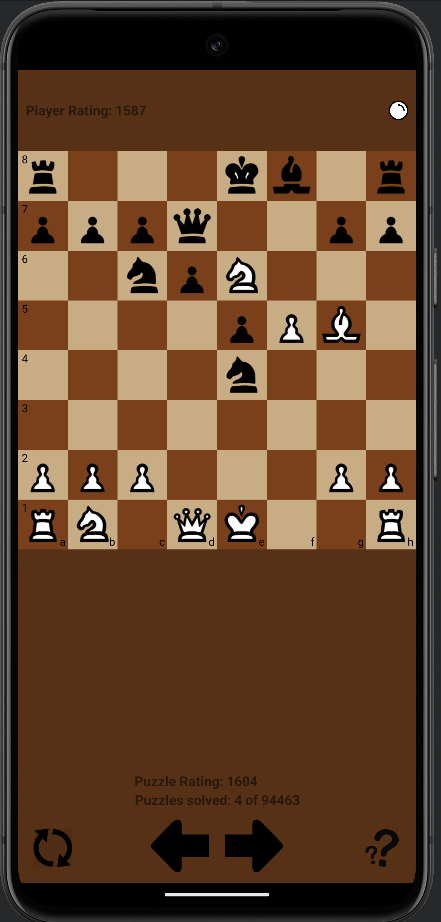
- Interactive Chessboard: The app features an interactive chessboard that allows users to solve puzzles and practice moves directly on the board.
- Extensive Puzzle Library: Access a vast library (100k puzzles) of chess puzzles ranging from 1600 to 3000 levels. Each puzzle is designed to challenge and improve your tactical thinking.
- Puzzle Categories: Puzzles are categorized by themes such as openings, middlegame tactics, and endgames.
- Detailed Puzzle Information: Each puzzle comes with detailed information, including the position, moves, rating, and tags, providing context and helping users understand the tactical themes.
- Performance Tracking: Track your progress with detailed statistics and performance metrics. See how you improve over time and identify areas that need more practice.
- User-Friendly Interface: The app features a clean and intuitive interface, making it easy to navigate and use for players of all ages.
- Offline Access: Puzzles can be practiced offline, ensuring you can train your tactics anytime, anywhere.
- Regular Updates: The app is regularly updated with new puzzles and features, ensuring a fresh and engaging experience.
Whether you are a beginner looking to learn the basics or an advanced player aiming to sharpen your skills, Tactic Trainer provides the tools and resources you need to become a better chess player. Download Tactic Trainer today and start your journey to mastering chess tactics!
Screenshots
How to install
- Download the APK from the button at the top of this page.
- Allow “Install unknown apps” for your browser or file manager only, not for every app.
- Open the downloaded file and confirm the installation.
- If installation fails with “App not installed,” remove an earlier build of the same app first. A signature conflict is the usual cause.
Data safety
- Every file is checked against its published SHA-256 before it is listed.
- Files are scanned for malware on every update.
- The permissions each app requests are listed on its own page.
- Read the full safety policy for how we test, flag, and delist files.
Comments
Recent approved comments · sorted by newest
View all comments