What’s new
* kml, gpx, poi format now supports symbols (icon in map or popup)
* added support for formats kmz (kml in zip), gpz (gpx in zip), poz (poi in zip)
* Toolbar "open file" action to pick a gpx, kml, kmx, ..... geo file

Updated Sep 22, 2026
Display geografic information from url or local gpx/kml file in a map
F-Droid repository metadata
The app has support for GPX and KML files, as well as the "geo URI scheme" and popular map services (google-maps, openstreetmap, yandex, ...).
It can work offline (without Internet/WiFi) once geodata has been downloaded and cached.
Other Android apps can use LocationMapViewer through an Intent-interface.
Required Android Permissions:
* INTERNET: to download map data from Open Streetmap Server * ACCESS_NETWORK_STATE and ACCESS_WIFI_STATE: to find out if wifi/internet is online to start downloaded geodata * WRITE_EXTERNAL_STORAGE (to cache downloaded map data in local file system and to load gpx/kml-Files to be displayed in the map) * ACCESS_FINE_LOCATION and ACCESS_COARSE_LOCATION: to display my own location in the map
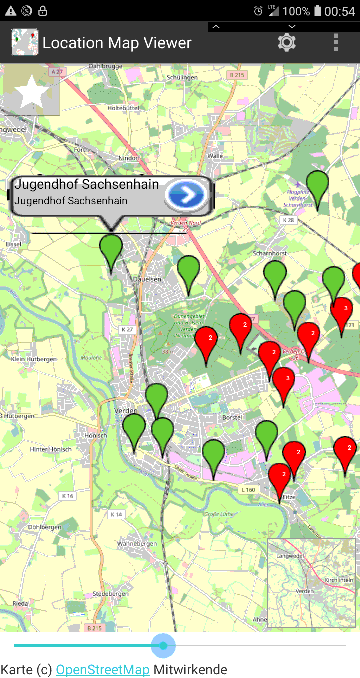
* kml, gpx, poi format now supports symbols (icon in map or popup)
* added support for formats kmz (kml in zip), gpz (gpx in zip), poz (poi in zip)
* Toolbar "open file" action to pick a gpx, kml, kmx, ..... geo file
Recent approved comments · sorted by newest
View all comments