Android IP Camera icon

Android IP Camera

DigitallyRefined
Connectivity Multimedia Remote Access Remote Controller Multimedia
Version
0.14.0
Size
4.9 MB
Requires
Android API 24+
4.5 / 5 · 4,722 ratings 26,613 downloads

Updated Oct 10, 2026

Quick answer

An Android H.264 / MJPEG IP Camera app

Features

  • 🌎 Built in server, just open the video stream in a web browser, video app or even set it as a camera for Frigate or a Home Assistant MJPEG IP Camera (using `https://[ip_address]:4444/video/mjpeg`)
  • 📴 Option to turn the display off while streaming
  • 🤳 Switch between the main or selfie camera
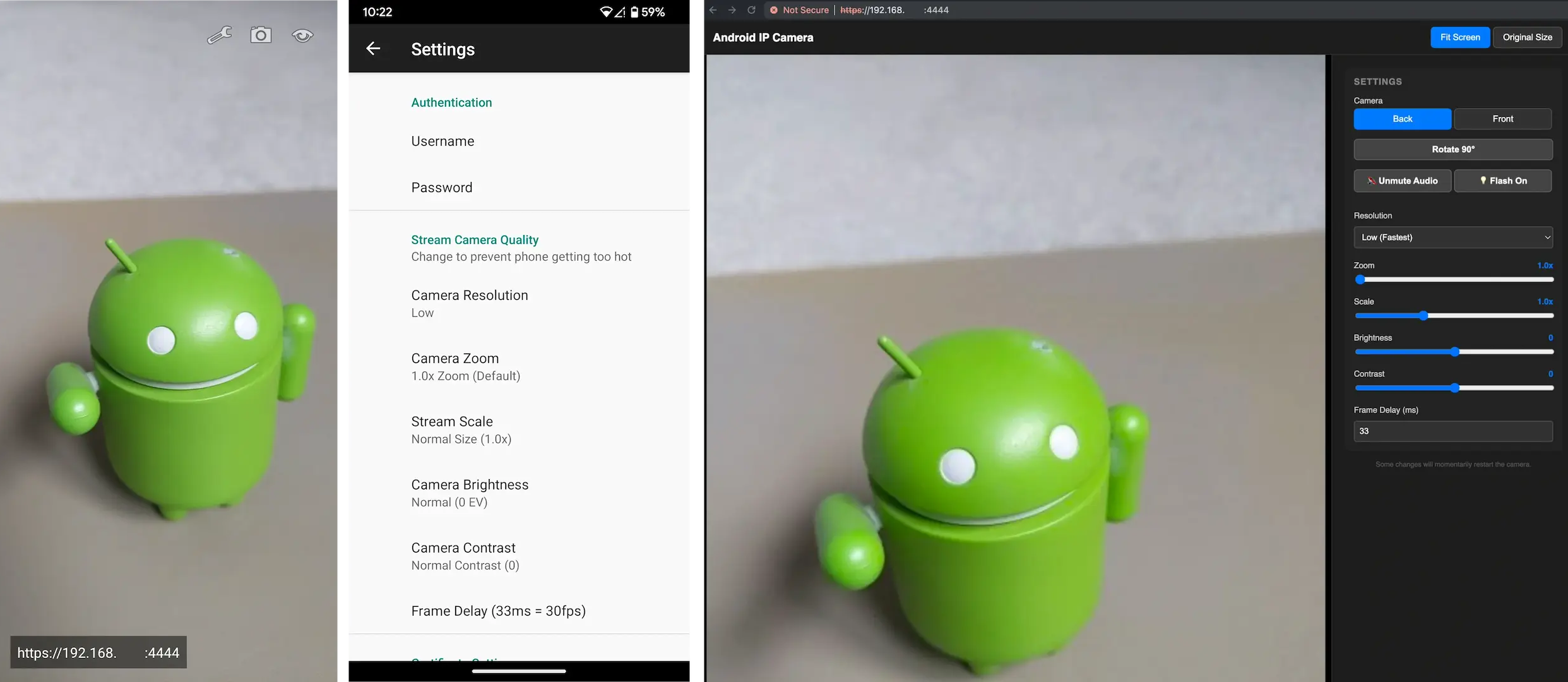
  • 🎛️ Remote web interface with controls for camera section, image rotation, video recording, audio/video sync, flash light toggle, resolution, zoom, exposure and contrast
  • 🖼️ Choose between different image quality settings and frame rates (to help reduce phone over heating)
  • 🛂 Username and password protection
  • 🔐 Automatic TLS certificate support to protect stream and login details via HTTPS
  • 🥾 Optional start on boot

Warning

If you are planning to run this 24/7, please make sure that your phone does not stay at 100% charge. Doing so may damage the battery and cause it to swell up, which could cause it to explode.

Some models include an option to only charge to 80%, make sure this is enabled where possible.

Note: running at a higher image quality may cause some phones to over heat, which can also damage the battery.

For more details/usage see: Android IP Camera GitHub Readme

Screenshots

Android IP Camera screenshot 1

What’s new

## What's Changed
* Add option to change video recording storage location in #105
* Add push-to-talk back to phone button & Docker builder in #106

**Full Changelog**: https://github.com/DigitallyRefined/android-ip-camera/compare/v0.13.1...v0.14.0

How to install

  1. Download the APK from the button at the top of this page.
  2. Allow “Install unknown apps” for your browser or file manager only, not for every app.
  3. Open the downloaded file and confirm the installation.
  4. If installation fails with “App not installed,” remove an earlier build of the same app first. A signature conflict is the usual cause.

Data safety

  • Every file is checked against its published SHA-256 before it is listed.
  • Files are scanned for malware on every update.
  • The permissions each app requests are listed on its own page.
  • Read the full safety policy for how we test, flag, and delist files.

Frequently asked questions

What is Android IP Camera?
An Android H.264 / MJPEG IP Camera app
Who develops Android IP Camera?
Android IP Camera is developed by DigitallyRefined.
Which Android version does Android IP Camera require?
Android IP Camera requires Android API 24 or later.
What is the current version of Android IP Camera?
The synchronized F-Droid version is 0.14.0.
Which license does Android IP Camera use?
The signed F-Droid metadata lists MIT.
Where is the source code for Android IP Camera?
https://github.com/DigitallyRefined/android-ip-camera

Comments

Recent approved comments · sorted by newest

Verification code
Be specific and keep it about the app. No links. Comments are reviewed before publication. Device and Android details are recorded automatically. Privacy policy.

Loading recent comments...

View all comments