
Quick answer
Help with partitioning into fractional parts (compute lcm).
F-Droid repository metadata
Parts are usually specified in the form of fractions as divident / divisor. With different parts using different divisors it is difficult to compare the sizes of the parts. The main gist of Parti is to determine the least common multiple (lcm) of all different divisors. (The different parts can be expressed using the lcm as common divisor making the parts easily comparable.)
Divisors are represented and processed as BigInts in order to provide exact results. (BigInts are designed to store whole values of arbitrary size, as long as enough memory is available.)
General Usage:
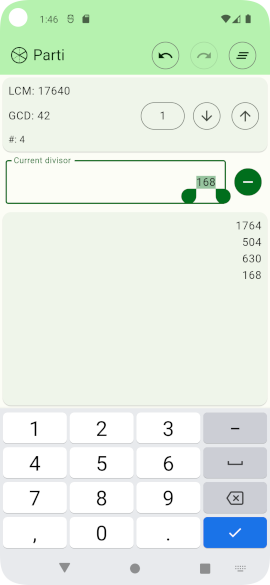
- After entering a divisor in the central editor widget it can be added / removed with the button to the right of the input field. The list of divisors in the bottom section is changed accordingly. Also, lcm and gcd in the top section are updated to reflect the new list of divisors.
- Tapping a value in the list puts the value into the editing widget. Dragging a list value to the left removes it from the list and puts it into the editor widget. Dragging a list value to the right removes it without changing the editor widget.
- In the top bar, a button for clearing the whole list is available. There are also buttons for undoing and redoing any changes of the current session.
- The value of the gcd can be changed deliberately with any change modifying the list of divisors accordingly: Tapping the value of the gcd opens a requester to replace the gcd with an arbitrary whole number. There is a button to set it to 1 (or to the value it had before it was set to 1). Further buttons increase or decrease the gcd by 1.
Screenshots
How to install
- Download the APK from the button at the top of this page.
- Allow “Install unknown apps” for your browser or file manager only, not for every app.
- Open the downloaded file and confirm the installation.
- If installation fails with “App not installed,” remove an earlier build of the same app first. A signature conflict is the usual cause.
Data safety
- Every file is checked against its published SHA-256 before it is listed.
- Files are scanned for malware on every update.
- The permissions each app requests are listed on its own page.
- Read the full safety policy for how we test, flag, and delist files.
Comments
Recent approved comments · sorted by newest
View all comments